

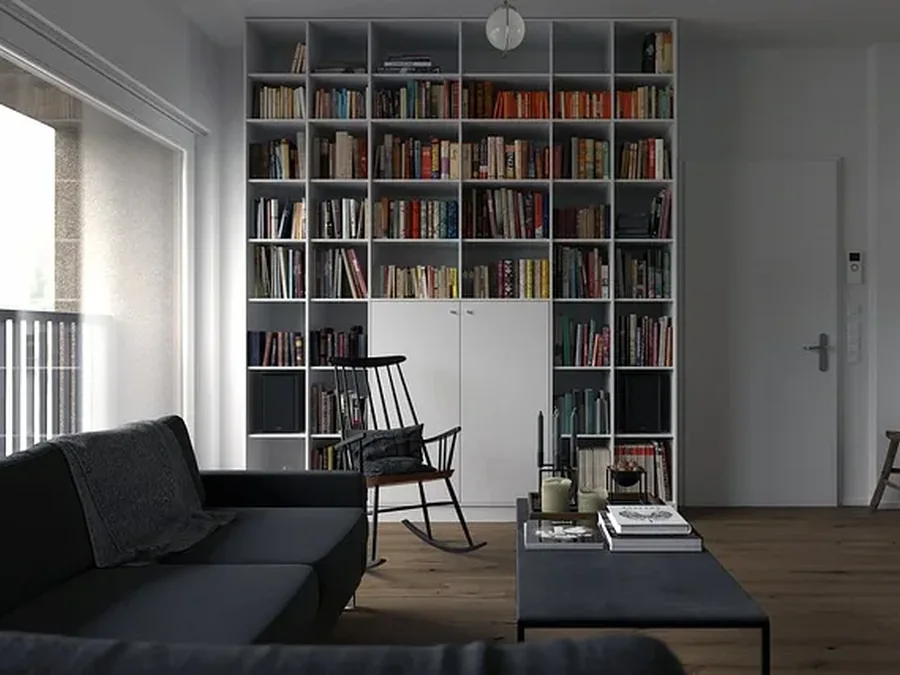
A great home office doesn't just happen. The secret to creating a space that actually works for you—and one you’ll enjoy spending time in—comes down to smart planning before any of the real work begins. Getting this foundation right is crucial. It’s what prevents costly mid-project changes and ensures your vision comes to life exactly as you imagined, whether you have a spare room or just a small corner. This guide will walk you through the practical steps to design a functional workspace in your South Florida home.
Quick Summary
- Define Needs First: Determine how you'll use the space—for deep focus, video calls, or creative projects—before choosing a location.
- Plan the Layout: Measure your space, sketch a floor plan, and consider ergonomics for long-term comfort and productivity.
- Integrate Technology: Plan for dedicated power circuits, sufficient outlets, and hardwired internet access from the start to avoid a mess of cords.
- Layer Your Lighting: Combine ambient, task, and accent lighting to reduce eye strain and create an inviting atmosphere.
- Maximize with Built-Ins: Use custom cabinetry to create seamless, floor-to-ceiling storage that maximizes every inch of your space.
- Know When to Call a Pro: Projects involving electrical, structural, or custom work require a licensed contractor to ensure safety and compliance.
First Steps to Your Productive Workspace
This is where you turn a vague idea into a solid blueprint. Before you get lost in paint swatches and desk catalogs, we need to answer two fundamental questions: what will you be doing in this space, and where will it be located? Thinking through these details methodically is the key. It helps you see the potential—and the potential problems—within your own home.
Define Your Workspace Needs
First, how do you actually work? The function of your office should drive every single design choice.
- Deep, Focused Work? If you need to concentrate without interruptions, a quiet, enclosed space is a must.
- Constant Video Calls? For client-facing professionals, this means planning for a clean, professional-looking background, great lighting, and solid acoustics.
- Creative or Hands-On Projects? Your work might demand large work surfaces, specialized storage for supplies, or a specific layout that a standard desk just can't accommodate.
Getting clear on these "non-negotiables" will guide the rest of your decisions.
Locate the Best Spot in Your Home
Once you know what you need from the space, it’s time to find its home. This is where you can get creative and look beyond the obvious spare bedroom.
- An underused guest room is often the path of least resistance.
- A quiet nook or corner of a living room or den can be sectioned off.
- We’ve seen clients get great results by reimagining a large walk-in closet or even a portion of their garage to create a compact, totally dedicated work zone.

Following this process of defining your needs, finding the right spot, and planning the layout is your best defense against rework and budget surprises.
Planning Your Home Office Layout and Function

You’ve picked your spot. Now it’s time to turn that empty space into an office that actually works for you. This is where we go from vague ideas to a real, functional plan. A good layout is about more than just aesthetics; it's about efficiency. With so many people working from home, homeowners here in Jupiter are increasingly asking us for custom office build-outs to create ergonomic spaces that just work.
Sketching a Smart Floor Plan
First, grab a tape measure. Get the room’s complete dimensions—length, width, and ceiling height. Don't forget to mark down where every window, door, and existing outlet is located.
Now, sketch out a basic floor plan. It doesn't have to be a masterpiece. Start by placing your biggest pieces of furniture—your desk and chair—to figure out your main work zone. Think about your office’s "work triangle," the path you'll take between your desk, your main storage (like a file cabinet), and any secondary surface (like a printer). The goal is to make that path as short and effortless as possible.
Ergonomics: The Foundation of Comfort
Ergonomics isn't just a buzzword. It's the key to avoiding the backaches and wrist pain that kill your focus. Getting this right is crucial for anyone spending hours at a desk.
- Your Chair: This is where you should invest. You need a chair with adjustable height, good lumbar support, and proper seat depth. When you sit, your feet should be flat on the floor, and your knees should bend at a comfortable 90-degree angle.
- Your Desk: While a standard desk is about 29-30 inches high, we’re fans of adjustable sit-stand desks. When you’re seated, your elbows should be at a 90-degree angle, allowing your wrists to stay straight when you type.
- Your Monitor: Your screen should be positioned so the top of it is at or just below your eye level. This simple adjustment prevents you from craning your neck or slouching all day.
Choosing Your Core Home Office Components
Your desk and storage are what make the room tick. The best choice comes down to how you work, how much space you have, and the look you’re going for.
| Component Type | Best For | Space Consideration | MELTINI Pro-Tip |
|---|---|---|---|
| Traditional Desk | All-purpose work, providing ample surface area and legroom. | Works well in medium to large rooms. Can feel bulky in a small nook. | Look for models with built-in wire management to keep cables tidy from the start. |
| Sit-Stand Desk | Professionals who want to vary their posture throughout the day. | The base requires clear floor space. Ensure vertical clearance for raising it. | A programmable memory function is worth it for one-touch height adjustments. |
| Built-In Desk | Maximizing space in small or awkward-shaped rooms. | Custom-fit to any dimension, turning unused corners into functional zones. | We can integrate lighting and power directly into the built-in for a seamless look. |
| Filing Cabinets | Storing physical documents securely and out of sight. | Can be bulky. Consider models that fit under the desk to save floor space. | For a cohesive design, we often build custom cabinetry to conceal standard file units. |
| Open Shelving | Displaying books, decor, and frequently accessed items. | Makes a room feel more open but requires diligence to keep it organized. | Use decorative boxes or bins to group smaller items and reduce visual clutter. |
Integrating Power, Data, and Light
A great home office is more than just a desk and a chair—it’s a technology hub. What separates a frustrating workspace from a seamless one is a smart plan for power, data, and lighting from the very beginning. We’ve all seen the tangled mess of cords snaking out from a single power strip. That's not just an eyesore; it's a recipe for tripped breakers and unreliable performance.
Getting Your Power and Data Right
Your computer, monitors, printer, and chargers all need power. If you overload a single circuit that's also powering other parts of your house, you’re asking for trouble.
For a serious setup, we often recommend installing a dedicated electrical circuit for the office. This isolates your sensitive equipment from the rest of the home's electrical load. No more screen flickers when someone starts the blender. Once the power source is solid, it's all about access.
- Smart Outlet Placement: We think through where your gear will live and place outlets behind the desk, near shelving, and sometimes even in the floor for a clean, floating desk look.
- Built-in USB Charging: Modern receptacles with integrated USB ports eliminate the need for bulky charging bricks, keeping your surfaces clutter-free.
- Hardwired Internet: Wi-Fi is convenient, but it’s not always reliable. For important video calls and large file transfers, nothing beats a hardwired Ethernet port for a fast, stable connection.
Designing a Layered Lighting Strategy
Good lighting is one of the most overlooked elements of home office design, but it has a massive impact on your comfort and focus. Just flipping on a single overhead light is a fast track to glare and eye strain. A layered approach is always the answer. This means combining three different kinds of light.
- Ambient Light: This is the general light that fills the room, usually from a central fixture or recessed cans that provide soft, even illumination.
- Task Light: This is your focused workhorse. A good desk lamp is the classic example, putting bright, direct light right where you need it for reading or writing.
- Accent Light: This adds personality. Think of small lamps on a bookshelf, picture lights on art, or soft LED strips built into custom cabinetry.
The color of the light also makes a huge difference. For work hours, a cooler, blue-toned light (around 4000K–5000K) helps keep you alert. When the day is done, you can switch to a warmer, yellow-toned light (around 2700K–3000K) to create a more relaxed vibe. You can learn more about the impact of lighting choices in our article.
Custom Storage and Finishes

This is where your home office truly comes together. While you can use standalone furniture, custom built-in cabinetry is what transforms a spare room into a polished, professional workspace. It’s the secret to keeping things orderly and creating a room that feels intentionally designed. By building storage specifically for your workflow, we can make the most of every square inch.
Maximizing Space with Custom Built-ins
The beauty of custom cabinetry is that it wastes zero space. Unlike an off-the-shelf bookcase that leaves an awkward gap, built-ins create a seamless, floor-to-ceiling look that feels completely integrated.
This is our chance to solve common office clutter problems from the start.
- Concealed Technology: We can design dedicated cabinets to hide bulky printers and shredders, keeping them accessible but out of sight.
- Integrated File Storage: Have standard metal filing cabinets? We can build beautiful cabinetry to enclose them, blending function with a much better look.
- Floor-to-Ceiling Bookshelves: Nothing makes a statement like a wall of bookshelves. It provides massive storage and becomes a stunning focal point.
- Invisible Cable Management: Built-ins are the ultimate solution for hiding cords. We plan for cutouts, grommets, and hidden channels from day one.
Selecting Materials and Finishes
The materials you pick for your cabinetry and countertops will define the room's vibe, durability, and cost. These choices make the space uniquely yours. You can dive deeper into all the possibilities in our guide to home office storage solutions.
Here are a few popular choices we see in Jupiter and Palm Beach homes:
Wood Veneer
This gives you the authentic look of real wood without the cost or instability of solid wood. A thin layer of genuine wood is applied over a stable core, which also makes it more resistant to warping in our South Florida humidity.
Paint-Grade Cabinetry
If you have a specific color in mind, this is the way to go. Made from materials like MDF or smooth poplar, these cabinets are meant to be painted. This opens up unlimited color options, from a crisp white to a dramatic navy or forest green.
Laminate and Thermofoil
For a busy office that needs to stand up to heavy daily use, laminates and thermofoils are a practical choice. They’re easy to clean, budget-friendly, and come in a huge variety of solid colors and realistic wood-grain patterns.
Local Note: Jupiter / Palm Beach County
When you're planning a custom home office here in South Florida, the design is just the starting point. The real success of a project comes down to navigating the realities of building in Jupiter and the greater Palm Beach County area.
- HOA and Condo Board Approvals: Before any work begins, contact your HOA or condo board. Many communities in Jupiter, Tequesta, and Palm Beach Gardens have strict rules about work hours, debris removal, and interior renovations, even for projects inside your home. Get everything in writing first.
- Humidity-Resistant Materials: Our climate demands smart material choices. For built-ins and desks, we recommend high-quality engineered materials or durable wood veneers over solid wood to prevent warping. Using moisture-resistant paints and finishes is also critical to protect your investment.
- Realistic Timelines and Dust Control: With high demand for home offices, lead times for custom cabinetry and other materials can be several weeks or months. A realistic schedule accounts for this. If you're living in the home during the remodel, ensure your contractor has a solid plan for dust control, using barriers and daily cleaning to minimize disruption.

What We See on Real Projects
After decades of building custom spaces here in Jupiter, we've learned what truly separates a decent home office from a great one. These are the practical lessons we share with every client.
- Desk Placement is Key: It’s natural to want to face a window, but this often creates screen glare. We usually recommend turning the desk 90 degrees to the window. You get the natural light without the distraction.
- Plan Technology for the Future: Don't just plan for the tech you have today. Think about what you might need in two or three years, like a second monitor, a scanner, or more charging ports. Adding extra outlets or an Ethernet port during the build is easy; retrofitting is messy and expensive.
- Prioritize a Great Chair and Lighting: When planning your budget, invest most heavily in two areas: a high-quality, ergonomic chair and layered lighting. These two elements have the biggest impact on your daily comfort and productivity. Skimping here is a mistake.
- Small Details Matter: We always ask clients to walk us through their typical workday. This simple conversation often reveals needs they hadn't considered, like a small secondary surface for paperwork or a specific drawer for frequently used supplies.
Mistakes to Avoid
Building a great home office is as much about what you don't do as what you do. Knowing these common pitfalls ahead of time will save you from future regret and frustration.
- Underestimating Future Storage Needs: One of the most frequent oversights is designing storage only for what you have right now. Your files, supplies, and tech will multiply. Plan for growth by including adjustable shelving and leaving space for future additions.
- Prioritizing Looks Over Ergonomics: That gorgeous, minimalist chair might look incredible, but if it has zero lumbar support, your back will pay the price. Always prioritize comfort for your core furniture. An ergonomic chair and a desk set to the proper height are non-negotiable.
- Attempting Complex DIY Work: While tasks like painting are great for a weekend project, complex electrical or structural work is another story. Depending on scope—especially electrical, plumbing, or structural work—this may require a permit. A licensed contractor can confirm requirements and handle permitting, ensuring everything is done safely and to code.
When to Call a Pro
Putting together a new desk and chair is one thing. But when your home office vision involves more than assembling furniture, it’s time to call a professional. If your plans include structural changes, new electrical work, or custom built-ins, you've crossed into professional territory.
A design-build firm acts as a single, accountable partner who can see your project through from start to finish. We handle the design, pull the right permits, ensure everything meets the Florida Building Code, and coordinate all the tradespeople. This proper management ensures the job is done right the first time. To get a better sense of what's involved, you can learn more about working with a general contractor in Jupiter, FL.
Next Step
Ready to create a home office that’s designed specifically for the way you work?
Schedule a consultation